






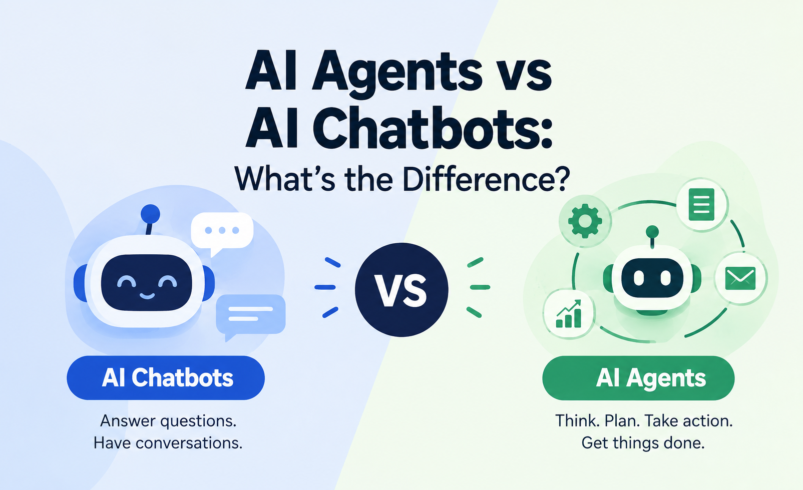

A chatbot primarily communicates with users, while an AI agent can use reasoning, tools, data, and actions to accomplish a goal. That’s the short version — but the real answer is more interesting, because the line between the two has been getting blurrier every year.
AI is the new electricity.
— Andrew Ng
If you’ve talked to a customer support bot on a website, you’ve used an AI chatbot. If you’ve heard about a system that can book a flight, update a CRM record, or research a topic and compile a report without someone typing each step, you’ve heard about an AI agent. Both are usually built on the same underlying technology — large language models (LLMs) — but they’re designed to do fundamentally different jobs.
This isn’t always a strict, universally agreed-upon technical boundary. Vendors use these terms inconsistently, and a lot of products sit somewhere in the middle. But there is a meaningful, practical distinction based on capability and architecture, and understanding it will help you figure out which one actually fits a given problem — whether you’re evaluating tools for a business or just trying to make sense of the terminology.
AI Chatbots Explained
An AI chatbot is a conversational software program designed to understand natural language input and respond with relevant, natural language output. Its core job is to hold a conversation — answering questions, guiding users through information, or handling routine requests.
How chatbots work, in plain terms: a user types (or speaks) a message, the chatbot’s underlying language model processes that input alongside relevant context, and it generates a response. Many modern chatbots are built on LLMs, which is why they can handle open-ended phrasing instead of requiring exact keyword matches like older rule-based bots did.
Most production chatbots also draw on:
- Conversation history — so the bot doesn’t lose track of what you said two messages ago.
- Knowledge bases and retrieval-augmented generation (RAG) — a technique where the system looks up relevant documents or data before generating a reply, so it can ground answers in a company’s actual product docs, policies, or FAQs rather than relying purely on what the model already “knows.”
- Integrations — connections to a helpdesk platform, a CRM, or a website’s live chat widget, mainly for the purpose of read-only lookups or handing off to a human agent.
Typical chatbot capabilities include answering FAQs, walking users through troubleshooting steps, qualifying a lead with a few questions, or retrieving an order status from a database. Common limitations show up quickly outside that lane: most chatbots can’t independently decide to take a multi-step action, they can struggle with requests that require combining several systems, and they generally need a human to step in once a conversation gets complex or the underlying knowledge base doesn’t have the answer.
What Is an AI Agent?
An AI agent is a system built to pursue a goal, not just answer a message. It’s given an objective — “resolve this customer’s shipping issue,” “research this topic and summarize the findings,” “schedule this meeting across three calendars” — and it works out the steps needed to get there, often using external tools and data along the way.
The key capabilities that separate an agent from a chatbot:
- Goal-oriented behavior — an agent is oriented around completing a task, not just responding to the latest message.
- Planning — breaking a goal into a sequence of steps before (or while) executing them.
- Reasoning — evaluating information, weighing options, and deciding what to do next based on results so far.
- Tool use and API calls — an agent can call external tools: querying a database, hitting a company’s internal API, searching the web, or triggering an action in another piece of software.
- Accessing external data — pulling in live information rather than relying only on what’s in its training data or a static knowledge base.
- Memory and context — retaining relevant information across a task, and sometimes across sessions, so it can pick up where it left off.
- Decision-making — choosing between multiple possible actions or tools based on the situation.
- Multi-step workflows — executing a chain of actions rather than a single response.
- Taking actions on behalf of users — this is the biggest practical difference. An agent doesn’t just tell you the order is delayed; it can check the shipping API, and in some setups, initiate a refund or send an update — usually within defined permissions.
- Human approval and oversight — well-designed agent systems build in checkpoints where a person reviews or authorizes higher-stakes actions before they happen, rather than letting the system act with unlimited autonomy.
The important distinction here: simply putting a chatbot interface on top of an LLM doesn’t make it an agent. What makes something an agent is the combination of planning, tool use, and the ability to execute actions toward a goal — not just generating conversational text.
AI Agents vs AI Chatbots: Key Differences
|
Feature |
AI Chatbot |
AI Agent |
|
Primary purpose |
Communicate and answer questions |
Accomplish a goal or complete a task |
|
Interaction |
Turn-based conversation |
Can operate with less back-and-forth, working toward an outcome |
|
Goal |
Respond helpfully to the current message |
Achieve a defined objective, often multi-step |
|
Reasoning |
Generates relevant responses from context |
Evaluates situations and decides next steps |
|
Planning |
Minimal to none |
Breaks goals into sequential or conditional steps |
|
Tool usage |
Limited, mostly for retrieval |
Core capability — calls APIs, databases, and other software |
|
External systems |
Often read-only lookups |
Can read from and write to external systems |
|
Ability to take actions |
Rare or absent |
Central feature, within defined permissions |
|
Multi-step tasks |
Difficult or unsupported |
Designed for this |
|
Autonomy |
Low — responds only when prompted |
Higher — can execute several steps toward a goal |
|
Memory/context |
Conversation-level |
Can span an entire task or multiple sessions |
|
Human oversight |
Human handles anything the bot can’t |
Built-in approval checkpoints for sensitive actions |
|
Automation |
Conversational automation |
Process and workflow automation |
|
Typical use cases |
FAQs, support, lead capture |
Order resolution, research, cross-system workflows |
|
Complexity |
Lower to build and maintain |
Higher — more moving parts, more testing needed |
|
Business applications |
Customer-facing conversation |
Operational and back-office automation |
In plain English: a chatbot is optimized for answering. An agent is optimized for acting. A chatbot might tell you what your order status is if that data is already surfaced to it; an agent can go check the shipping system itself, and potentially do something about a problem it finds. The tradeoff is that agents are more complex to build, test, and govern safely, precisely because they can do more.
AI Chatbot vs AI Agent — A Simple Real-World Example
The customer asks: “Where is my order?”
A traditional chatbot would typically try to match this to a known intent, then either pull a pre-fetched status if the ecommerce platform already pushed that data into its knowledge base, or — more commonly — respond with something like “Let me connect you to a team member” or point the customer to a tracking page, because it doesn’t have a way to independently query the order system.
An AI agent handling the same request could work through something closer to:
- Understand the request — recognize this is an order-status inquiry.
- Identify the order — ask for or retrieve the order number/account details.
- Access the company’s order-management system via an API call.
- Check shipping information from the carrier’s tracking API.
- Determine the current status — in transit, delayed, delivered, etc.
- Respond to the customer with specific, current information.
- Potentially take another permitted action if needed — for example, flagging a delayed shipment for a refund review, or automatically issuing a small credit if that falls within its pre-approved permissions.
That last step is the real dividing line: the chatbot answers what it knows; the agent goes and finds out, then can act on it.
A second example — sales development: a chatbot on a company’s pricing page can answer “What plans do you offer?” and capture an email address for a human sales rep to follow up. An AI agent handling lead qualification could instead look up the company domain in a data enrichment tool, check whether that account already exists in the CRM, score the lead based on firmographic fit, draft a personalized follow-up email, and schedule it to send — then log all of it back into the CRM automatically, escalating to a human rep only if the deal looks high-value or the prospect asks a question outside its scope.
How AI Chatbots Work
The basic chatbot loop looks like this:
User → AI model → Knowledge/context → Response → User
A user sends a message. The underlying LLM processes it, often alongside retrieved context from a knowledge base (via RAG) and recent conversation history. It generates a natural-language response, which is returned to the user. If the chatbot is integrated with a CRM or helpdesk, that integration is typically used to pull information into this loop (for example, order details) rather than to trigger independent actions.
Key components: the LLM generates language; prompts (including system instructions) shape how it responds; context includes both the conversation so far and any retrieved documents; RAG lets the model reference specific, up-to-date information instead of only what it learned during training; and APIs/integrations connect the chatbot to the systems it needs to read from.
How AI Agents Work
Agent systems typically follow a loop that looks more like this:
Goal → Understand → Plan → Select tools → Execute actions → Observe results → Adjust → Complete task
An agent is given a goal (either directly by a user or triggered by an event). It interprets what’s being asked, forms a plan — which might be a fixed sequence of steps or something more dynamic — and selects which tools it needs: a database query, a web search, an internal API call. It executes an action, observes the result, and decides whether to continue, adjust its plan, or ask for human input. This continues until the task is complete or it hits a limit that requires escalation.
Important concepts here:
- Agent loop — the repeated cycle of reasoning, acting, and observing results, which distinguishes agents from single-turn responses.
- Tool calling — the mechanism by which an LLM-based system invokes an external function or API rather than just generating text.
- Memory — short-term (within a task) or longer-term (across sessions) storage of relevant information.
- Environment — the systems and data the agent operates within (a CRM, a codebase, a set of APIs).
- Feedback — using the result of one action to inform the next decision.
- Workflow orchestration — coordinating multiple steps, and sometimes multiple specialized agents, toward a larger outcome.
- Human approval — a checkpoint, built deliberately into the workflow, where a person confirms or reviews an action before it’s finalized — especially important for anything irreversible or high-stakes, like a payment or a customer communication.
AI Agent Examples
- Customer service agent — resolves an issue end-to-end: looks up the account, checks order or account status across systems, and takes an approved corrective action (like issuing a store credit) instead of just describing the problem.
- Sales development agent — qualifies inbound leads, enriches contact data, updates CRM records, and drafts outreach.
- IT support agent — diagnoses a common issue (like a password reset or access request), checks the relevant system, and executes the fix directly, escalating anything unusual to a human technician.
- Research agent — given a topic, searches multiple sources, extracts relevant information, and compiles a structured summary rather than returning one generic answer.
- Ecommerce agent — handles a return request by checking order eligibility, generating a return label, and updating inventory systems.
- Scheduling agent — checks multiple calendars, resolves conflicts, and books a meeting time without a human going back and forth over email.
- Marketing automation agent — pulls campaign performance data from multiple ad platforms, identifies underperforming segments, and adjusts budget allocation within pre-set rules.
- Data analysis agent — queries a database, runs calculations, and produces a report or visualization based on a stated question.
- Software development agent — given a bug report, locates the relevant code, proposes a fix, and can run tests to check whether it resolves the issue.
AI Chatbot Examples
- Customer support chatbot — handles common questions (shipping policies, return windows, account basics) and escalates anything it can’t answer.
- FAQ chatbot — a narrow, knowledge-base-driven bot that works well on pages with a limited, well-defined set of common questions.
- Website chatbot — a general-purpose assistant embedded on a site to help visitors find pages, products, or information.
- Ecommerce shopping assistant — helps users find products based on described preferences, mainly through conversation and product-catalog lookups.
- Internal employee chatbot — answers HR or IT policy questions using an internal knowledge base, reducing repetitive tickets.
- Knowledge-base chatbot — surfaces relevant documentation in response to a support or technical question.
- Lead-generation chatbot — engages website visitors, asks qualifying questions, and captures contact information for follow-up.
Each of these works best in bounded, well-documented domains where the goal is fast, accurate information delivery rather than independent action.
Benefits of AI Chatbots
Chatbots are popular for good reason: they provide 24/7 availability, fast responses to common questions, and can meaningfully reduce support workload on repetitive tickets. They scale easily — one chatbot can handle thousands of simultaneous conversations — and they give consistent answers, which matters for compliance-sensitive information. They’re also useful for customer engagement and lead generation, and compared to agentic systems, they’re generally easier and faster to deploy.
The honest limitation: chatbots are only as good as their underlying knowledge base and configuration. They can struggle with ambiguous questions, edge cases outside their training or documentation, and — critically — anything that requires taking an action rather than just providing information.
Benefits of AI Agents
Agents shine where a business needs workflow automation that spans more than a single exchange. They can execute multi-step tasks, integrate with multiple tools and systems, and meaningfully reduce manual work on repetitive cross-system processes — think reconciling data between two platforms, or handling a return from request to refund. Because they can act with context about a specific user or situation, they enable more personalized actions than a static workflow, and over time they can improve operational efficiency on processes that used to require a human stitching several tools together.
But agents are not automatically the “better” choice — they come with real tradeoffs, covered next.
Limitations and Risks of AI Agents
Because agents can take actions, the stakes of getting something wrong are higher than with a chatbot that only generates text. Key risks include:
- Hallucinations — an LLM-based agent can still generate incorrect information or misinterpret a situation, and if that misjudgment leads to an action rather than just a wrong sentence, the consequences are more concrete.
- Incorrect decisions — an agent might choose the wrong tool, misjudge a situation, or take a reasonable-seeming but ultimately wrong action.
- Excessive autonomy — giving an agent too much unsupervised authority increases the blast radius of any mistake.
- Security risks — agents that call APIs and access systems create new attack surfaces, particularly if they can be manipulated by malicious input (for example, embedded instructions in a document the agent is asked to process).
- Data privacy — agents that access customer or company data across systems need careful permissioning to avoid inappropriate exposure.
- Permission management — deciding exactly what an agent is and isn’t allowed to do, and enforcing that reliably, is a nontrivial engineering and governance task.
- API failures — agents depend on external systems being available and returning expected data; failures need graceful handling.
- Poor tool selection — an agent might pick an inefficient or inappropriate tool for a given step.
- Unexpected actions — without careful design, an agent might take an action a human wouldn’t have chosen.
- Monitoring and human oversight requirements — responsible agent deployments need logging, monitoring, and often human-in-the-loop approval for higher-stakes actions.
- Reliability — multi-step processes compound error rates; a small mistake early in a chain can cascade.
- Cost and infrastructure complexity — agents typically require more engineering investment, testing, and ongoing maintenance than a chatbot.
This is why responsible deployments pair agent capability with appropriate permissions, monitoring, testing, and human approval — especially for anything involving money, customer communication, or irreversible actions.
Limitations of AI Chatbots
Chatbots have their own, generally lower-stakes, limitations: a limited ability to take actions beyond conversation, the possibility of incorrect answers if the knowledge base is outdated or incomplete, context limitations (losing track of earlier parts of a long conversation), knowledge limitations outside their configured domain, integration challenges when connecting to legacy systems, the frequent need to escalate to human support for anything complex, hallucinations in ambiguous or under-documented areas, and general difficulty handling multi-step or conditional workflows.
AI Agents vs AI Chatbots for Business
There’s no universal winner — the right choice depends on the task’s complexity, risk, and how much independent action is actually needed.
|
Business need |
More suitable approach |
Why |
|
Answer FAQs |
Chatbot |
Simple, bounded information retrieval doesn’t need planning or action |
|
Customer support |
Chatbot (with agent escalation for complex cases) |
Most inquiries are informational; complex resolutions may need agent capabilities |
|
Lead qualification |
Either, depending on depth |
A chatbot can capture basic info; an agent can enrich, score, and route leads automatically |
|
Order tracking |
Chatbot for status lookup; agent if action is needed |
Checking status is informational; resolving a shipping problem may require action |
|
Scheduling |
AI agent |
Requires checking multiple calendars and coordinating a booking |
|
Complex workflow automation |
AI agent |
Inherently multi-step and cross-system |
|
Research |
AI agent |
Requires searching, synthesizing, and compiling information from multiple sources |
|
Data processing |
AI agent |
Involves querying, transforming, and acting on data across systems |
|
Multi-system tasks |
AI agent |
Chatbots generally aren’t built for cross-system orchestration |
|
Simple website assistance |
Chatbot |
Low complexity, high volume, doesn’t need autonomous action |
The general pattern: if the goal is conversation and information delivery, a chatbot is usually the more proportionate and lower-risk choice. If the goal involves coordinating across systems or taking action, an agent’s added complexity starts to pay for itself.
Can an AI Chatbot Become an AI Agent?
Yes — and this is one of the more important practical points in this whole comparison. A chatbot can gain agent-like capabilities incrementally, rather than needing to be rebuilt from scratch. That typically happens by adding:
- Tools and APIs — giving the chatbot the ability to call external systems, not just retrieve static information.
- External data access — connecting it to live data sources beyond a static knowledge base.
- Memory — allowing it to retain context across a longer task or multiple sessions.
- Planning — enabling it to break a request into steps rather than responding to each message in isolation.
- Workflow orchestration — letting it coordinate a sequence of actions toward an outcome.
- Permissions — defining exactly what actions it’s allowed to take, and under what conditions.
- Action execution — the final step: actually letting it do something, not just say something.
This is why the boundary between chatbots, assistants, and agents is often blurry in practice. Many products marketed as “AI assistants” sit somewhere in between — more capable than a pure FAQ bot, but not fully autonomous agents either. The distinction is really a spectrum of capability, not a hard category line.
AI Agents vs Conversational AI
These terms get used inconsistently across the industry, which causes a lot of confusion:
- Chatbot usually refers to the conversational interface itself.
- Conversational AI is a broader term for the underlying technology (NLP, LLMs, dialogue management) that powers chatbots and voice assistants.
- AI assistant often implies a somewhat more capable, personalized system — Siri or Alexa, for example — that may include some ability to trigger actions (like setting a timer or sending a text) but isn’t necessarily a full autonomous agent.
- AI agent implies goal-directed behavior with tool use and action-taking, as described throughout this article.
- Agentic AI is increasingly used as an umbrella term for systems and architectures built around autonomous, multi-step reasoning and action — the broader design philosophy that individual AI agents are built on.
There isn’t one universally accepted technical definition that all vendors follow, so it’s worth reading a specific product’s documentation to understand what it actually does, rather than assuming based on the label alone.
The Future of AI Agents and AI Chatbots
The clear direction of travel is toward more agentic workflows — systems that don’t just answer but act, increasingly embedded into business processes rather than sitting only in a chat window. Enterprise adoption of task-automating AI is growing, and it’s reasonable to expect more integrations connecting AI systems to the tools businesses already use.
At the same time, established, well-understood chatbot use cases — FAQs, basic support, lead capture — aren’t going away; they remain a proportionate, lower-risk solution for a large share of conversational needs.
What’s genuinely emerging, rather than already mature, includes multi-agent systems (multiple specialized agents coordinating on parts of a larger task) and more mature standards for AI security and governance as agents take on higher-stakes responsibilities. It’s reasonable to expect more assistants becoming action-oriented over time, but the pace and specifics of that shift — particularly around how much autonomy businesses are comfortable granting — remain to be seen rather than settled facts. The technology’s trajectory is clear; the exact timeline and shape of enterprise adoption is not something that can be predicted with precision.
Frequently Asked Questions
What is the difference between an AI agent and a chatbot? A chatbot is designed to hold a conversation and answer questions using an LLM and a knowledge base. An AI agent is designed to pursue a goal — it can plan, use tools, access external systems, and take actions, not just generate replies.
Is ChatGPT a chatbot or an AI agent? By default, ChatGPT functions as a conversational chatbot. However, when given tools — like web browsing, code execution, or the ability to call external APIs and take actions — it can operate more like an agent. The distinction depends on what capabilities and tools are enabled in a given configuration, not on the underlying model alone.
What can AI agents do that chatbots cannot? Agents can independently query external systems, chain together multiple steps, and take actions on a user’s behalf — like updating a record, issuing a refund, or booking a meeting — within defined permissions. A typical chatbot is limited to generating a conversational response.
Are AI agents more advanced than chatbots? In terms of architecture and capability, yes — agents generally involve more complex reasoning, planning, and system integration. That doesn’t mean agents are always the better choice; added capability comes with added complexity, cost, and risk that isn’t justified for simple use cases.
Can a chatbot become an AI agent? Yes. Adding tools, external data access, memory, planning, and permissioned action execution can turn a conversational chatbot into something that functions as an agent. The transition is often incremental rather than a full rebuild.
What are examples of AI agents? Customer service agents that resolve issues end-to-end, sales development agents that qualify and route leads, IT support agents that execute fixes, research agents that compile information from multiple sources, and scheduling agents that coordinate calendars are common examples.
What are examples of AI chatbots? FAQ bots, website assistants, ecommerce shopping assistants, internal employee helpdesk bots, and lead-generation chatbots are typical examples.
Are AI agents expensive? Generally, agents cost more to build and maintain than chatbots, due to the added engineering work involved in tool integration, permissioning, testing, and monitoring. Exact costs vary widely depending on the complexity of the workflow and the systems being integrated.
Are AI agents safe for businesses? They can be, when deployed with appropriate permissions, monitoring, testing, and human oversight for higher-stakes actions. Risks like hallucination, incorrect decisions, or unintended actions are real, which is why responsible deployments limit autonomy and build in approval checkpoints rather than granting unrestricted authority.
When should a business use an AI agent instead of a chatbot? When the task requires coordinating across multiple systems, executing multi-step processes, or taking action rather than just providing information — for example, resolving a complex support case end-to-end rather than just answering a question about it.
Do AI agents use large language models? Most modern AI agents are built on LLMs for their reasoning and language capabilities, combined with additional components for tool use, planning, and memory that the base model alone doesn’t provide.
What is agentic AI? Agentic AI is a broader term for AI systems and architectures designed around autonomous, goal-directed behavior — planning, using tools, and taking multi-step actions — rather than simply generating a single response to a prompt.